Stop Rebuilding the Same Reports | Roadmap Review April 2026
- Introducing AI-Powered Donor Research Profiles
- How to Turn First-Time Donors Into Repeat Donors (Without Begging)
- How to Know When (and Whether) to Apply for a Grant
- Stop Rebuilding the Same Reports | Roadmap Review April 2026
- Best Nonprofit Accounting Software: A Complete Guide
- Introducing the New Advanced Relationship Search in MonkeyPod
- 7 Steps to Launching an Effective Matching Gift Campaign
- Making a Data Management Plan: The Importance of Clean Data
- Data Transparency–The Secret to Unlocking Your Team's Potential
- How to Start a Nonprofit–A Checklist for New Organizations
- Unlock More Matching Gift Revenue with Less Effort: MonkeyPod + Double the Donation
- Automate Your Payroll With MonkeyPod and Gusto
There's a report someone runs every Monday morning. There's a donor list that takes 20 minutes to rebuild in a spreadsheet. There's a donation record that makes you wonder: did we actually send a receipt? There's a constituent whose record doesn't tell you who on your team is supposed to be managing the relationship.
None of these are hard problems. They're just friction. The kind that accumulates quietly until your staff is spending more time navigating software than doing the work that actually matters.
MonkeyPod is on a mission to remove as many of those barriers and points of friction as we can, and our latest product updates do just that.
Save and share reports automatically
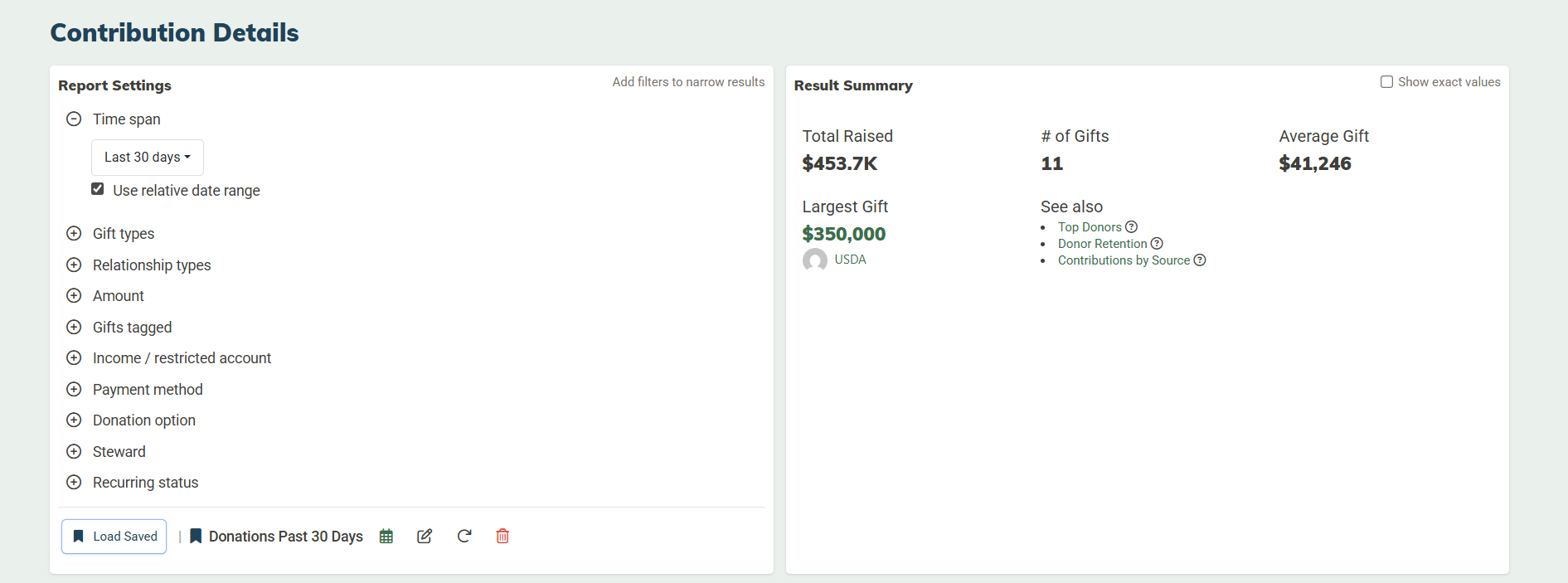
If there's a report your organization needs on the same day, every week — contributions from the last 30 days for your ED check-in, a sales summary for the board, something your bookkeeper generates every Monday morning — you can now set it up once and have it arrive automatically.
Here's how it works: you can now save report configurations for Contribution Details and Sales Details. Your filters, date ranges, and column preferences are all saved and reloadable. That alone eliminates the "rebuild from scratch every time" problem.
But you can go a step further and schedule a saved report to be emailed to you automatically on a cadence: daily, every Monday, the 1st of the month, or the 15th.
And because these reports support dynamic date ranges, a configuration for "last 30 days" will always reflect the most recent 30 days — not the date you first saved it. Your Monday report won't quietly age into irrelevance.
Find exactly who you're looking for (without the spreadsheet detour)
There's a version of constituent search that most nonprofit CRMs offer: filter by a few basic fields, get a list, export it, clean it up in Excel. It works, technically. It's just a lot of steps for something that should be straightforward.
The Advanced Relationship Search in MonkeyPod has always been more capable than that, but these recent updates take it significantly further. The new foundation is a criteria-and-conditions structure: a criterion is a single filter (like "gave more than $500" or "lives within 10 miles"), and a condition groups one or more criteria together using AND (to narrow results) or OR (to broaden them). You can chain multiple conditions together across your entire database.
The practical result: a query like "volunteers who logged at least 10 hours last year and opened our last three emails, but don't yet have a mailing address on file" can now be completed directly in MonkeyPod. In seconds.
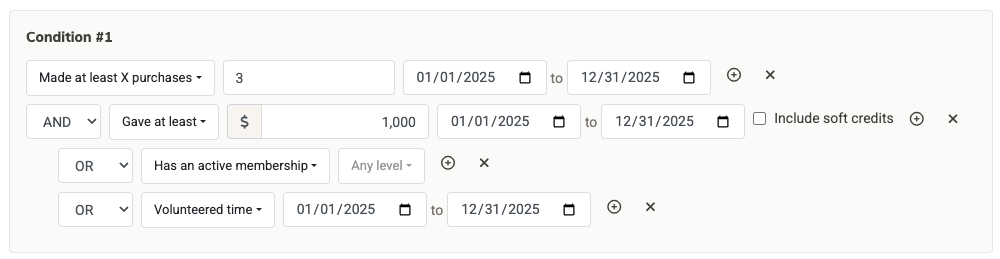
The new Advanced Search is a big update, and we're really excited about it. Learn more about all the details here.
While we get feedback on this new tool, we're already making improvements and enhancements. We've added additional search criteria like volunteer hours and simplified the process for selecting columns to view in your results.
In addition, saved searches now support dynamic date ranges: Lifetime, Last 30 Days, Last 365 Days, This Fiscal Year, Last Fiscal Year. A saved search for "donors who gave in the last 365 days" stays current automatically. Pair it with a smart email list and your donor segment maintains itself without manual upkeep.
The information your development staff needs before every call
Good donor stewardship starts with good information. Two new cards available on relationship records make it faster to walk into a donor conversation prepared.
The Giving Analytics card puts the key numbers right on the record: lifetime giving total, average gift amount, donation frequency, date and amount of their last gift, and whether they're a recurring donor. It's the snapshot you'd otherwise build manually before a cultivation call. But now, it's available every time you open a record, without pulling a report or scrolling through transaction history.
The Stewardship card addresses a different but related problem: who on your team is actually accountable for this relationship? The card lets you formally assign one or more staff members as stewards for a constituent. Stewards are searchable in Advanced Relationship Search, so you can pull a list of every constituent assigned to a specific team member, identify relationships without a steward assigned, or segment by steward for targeted outreach.
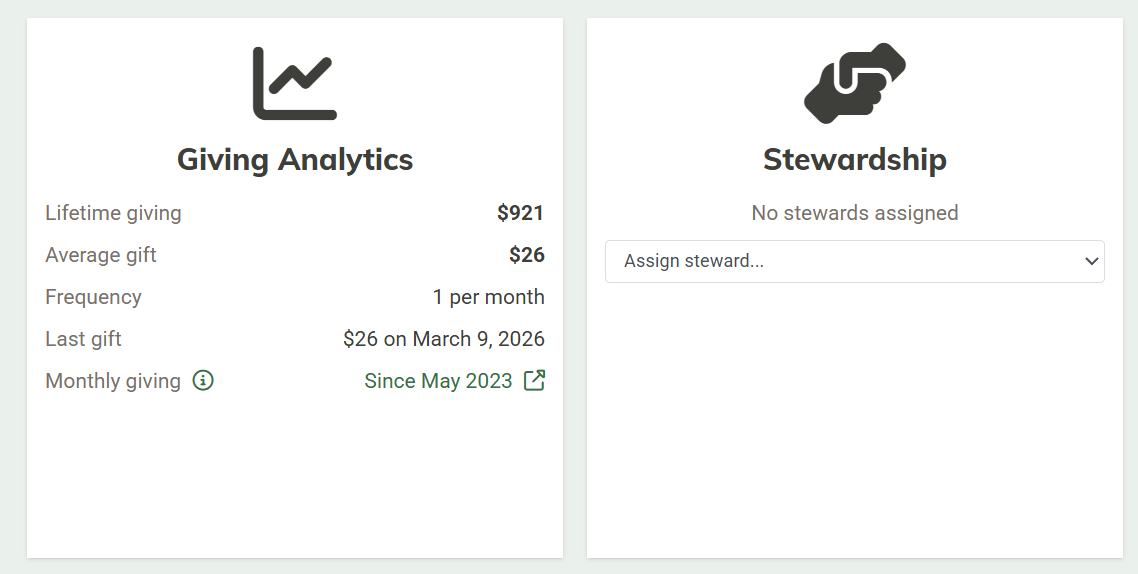
Steward data is also visible in the Contribution Details report. And when you assign a steward to a record, they're automatically set as the prospect steward in Campaign Tracker, so your CRM and fundraising pipeline stay in sync without extra steps.
All that and more
These features are just the tip of the iceberg. We've also improved receipt tracking, added additional details to a bunch of reports, improved BCC to MonkeyPod, and much much more. Head to the Changelog to view the full details.
And if you're interested in exploring how you can put these features to work, schedule a demo with our team.